.webp)



Man vs Machine
This July I’ve reached my developer young adulthood. Having worked on various integrations of Generative AI into software these past few years, I was also granted the rank of an AI General.
I took on new responsibilities including guiding younger developers. The contrast of the old and the new struck me. Green as summer grass, they have not known winter. AI chat is now often the first and last point of interaction for research and bug fixing—not debugging or Google, but straight to AI suggestions and hallucinations.
I wasn’t convinced about the usefulness of using AI to code, commonly referred to as vibe coding. Especially having a good knowledge of how Large Language Model predictions work and all the common misconceptions about them.
I’ve had not-so-good experiences using OpenAI models for coding, some better experiences with Claude, but I generally wound up spending more time explaining what I wanted and then retrofitting it manually than I would have liked. I mostly used the tools to help jump start learning new things.
And all of that made me confused. Some people have sworn by vibe coding, and I wasn’t quite sure to what degree those were delusions vs real business value. Cursor and Claude Code were trending, and having used Cursor, it made me skeptical about the code people were deploying.
Still, I wanted no less than to call this bluff and give it my best go since benefits could be tremendous. How much harder could it be to prompt AI than to prompt real people?
No fluff development
Some time ago, my company Freeport Metrics started building a custom tool for Project Resource Planning. We made some progress on that, but ended up going back to spreadsheets anyways.
Long story short, we agreed that I’d attempt to recreate the core ideas behind this 1-year bench/beach project in 1-week. And I didn’t know much about it to begin with, to make things more interesting.
Those less informed might say I had that much more of a difficult time because of that. Yet, what went unsaid is that this was the reason why I agreed to this short timeframe, and my first predictor of success.
It allowed me to keep it simple. I reviewed the various application screens, the PRP spreadsheet, and defined the problem in the following way:
Our current PRP tool allows us to manage Clients, Projects, Employees, Allocations, and Billing. At the most basic level, the app should allow managing those entities and needs to have some timeline / calendar visualisation. The details of those things are going to be mostly discussed and defined together with AI.
…and I ran with it. I just needed to define my AI stack.
Hype detective
I started off my research by accident when I encountered a tool called Traycer AI. It was a regular evening of watching Code Report, but then I decided I’d let the sponsored segment influence me.
Traycer AI is used for spec-driven development using AI. I’ve already been a little bit interested in that topic since Amazon announced Kiro back in September. The general idea of Traycer AI is quite simple — plan first, code second. Traycer delivers on a very comprehensive planning phase, the developer is supposed to hand off to a coding agent, and then back to Traycer AI for review.
I’m going to need a coding agent, I thought. Almost unanimously, people are praising Claude Code as their coding agent of choice. Sometimes it was Codex, sometimes Cursor, but usually Claude Code.
Ok, but how is Claude Code different from Claude? The subscription is $100 per seat per month, or $150 at the business tier. It’s using the same models as the web app, except the subscription is over 5x more expensive. And people are paying for this. Wait, people are paying for this, why?
Well, the answer lies in the different agentic features, a direct access to your codebase, and the various tools. LLMs are the most flexible non-sentient interface for interaction to date. They struggle when trying to override their beliefs or learn new things, but they fake reasoning incredibly well by building predictions on top of predictions.
The trick is to treat your LLMs as that very flexible interface, and give them access to useful context, up-to-date information, and predictable tooling, then ask them to break down problems into a step-by-step plan. In this iterative process, agents built with LLMs become more than the sum of their parts.
Vibe coding setup in 8 steps
1. Purchase a Claude seat — Pro for a trial run, Max or Team to develop a full app.
2. Install Claude Code to use as your coding agent and try running it in your terminal according to Claude Code overview - Claude Code Docs. You can also try alternative coding agents like Cursor or Codex.
3. Use Visual Studio Code with your favorite extensions or pay for a Cursor business seat. Make sure to enable Privacy Mode in Cursor Dashboard - Settings which is one of the features unlocked at the business tier.
4. Make a Traycer AI account — use the free tier for testing, Lite or Pro to develop a full app.
5. Install the Traycer AI extension in your code editor, pin the extension for easy access, and follow instructions to connect it with your account.
6. Set up your coding agents and co-pilots to use desired Large Language Models — I recommend using the latest Anthropic’s Claude model (Opus 4.5 at the time of writing) for something very reliable and Cursor’s Composer 1 when you need something fast and simple.
7. Configure your coding agents and your planning agent (Traycer AI) with Model Context Protocol (MCP) tools. These allow you to rapidly extend agent capabilities. Use Context7 MCP for access to up-to-date documentation, then configure the coding agents with Playwright MCP or Chrome Dev Tools MCP to autonomously test your application through a browser running on your machine, and Figma MCP if you want to use your own designs.
8. Optionally, you can look online for a community-made Claude Code workflow you like for inspiration or to use it with your codebase.
Vibe, take the wheel
Project requirements
I started off discussing the business domain and the problem with Claude Sonnet 4.5 to prepare basic requirements for the project, then with Traycer AI to add more details. I recommend using your coding agent (Claude Code, Codex, Cursor, or other) and taking advantage of its agentic features instead of using Claude or ChatGPT if you can spare the tokens.
I mostly let the agents define the finer details and choose what they believe best in terms of the tech stack. If the LLMs work within their comfort zone, they should be able to perform better, I decided. If you want to use a particular tech stack and architecture, feel free to experiment with the prompts and configuration, it might just take more work to get similar quality of results.
At the end of that process, I had three markdown documents with the project brief, details, and all tech stack choices.
The brief is the story behind your project. Details describe entities, database schema, application views, core business logic, formatting, additional features, and summarize the scope, explicitly including some features and excluding others.
The tech stack it suggested for my application included the following: Next.js 14 (ended up using 16 instead), React, Tailwind, shadcn/ui, PostgreSQL via Prisma ORM, NextAuth.js, other minor libraries, and pnpm as the package manager.
Phase breakdown
With that, Traycer generated a phase breakdown for me. I did end up adding one missing phase to that list. For context, this is what I’ve ended up with:
- Setup Project Foundation & Infrastructure
- Implement Core CRUD APIs for All Entities
- Build Basic UI Shell & Entity Management Forms
- Implement Project Dashboard Grid with Editable Cells
- Implement Business Logic Calculations & Variance Indicators
- Build Multi-Project Overview with Filtering
- Manage Project Team
- Build Employee Allocation Timeline View
- Implement Excel Export & Responsive Design
- Implement AI Natural Language Queries with Structured Outputs
- Implement AI Data Entry Commands with Structured Outputs
Context for the coding agent
Based on those requirements, you can ask your coding agent of choice to generate a CLAUDE.md file or similar. The agent config file should have a project overview, reference the basic documentation, and have all of the core rules defined for the development.
For existing projects, you can use the /init command with Claude Code to explore your codebase and prepare that file based off of that. This also makes it way easier to get a grasp of a new codebase as you can just have your agent crawl through all relevant files to create an overview.
Make sure to include explicit instructions about the workflow the agent should follow and when the agent should use the MCPs or it might end up never using those tools.
Planning and implementation
Developing phase by phase, I asked Traycer AI to generate a detailed implementation plan for my first phase. Review those carefully when developing full systems or when you have very specific requirements for the code. You can chat with Traycer to ask it to make specific changes.
Before handing off to your coding agent for implementation, copy the plan as markdown into a file and share it with the agent, asking it for feedback. Review and discuss the feedback, then send it back to Traycer AI to make changes, and back to your coding agent to confirm.
The goal is to create a plan that the coding agent and Traycer can agree on. It will improve the quality of the outputs if it’s congruent with the coding agent’s vision of the world, and ensure that code review from Traycer does not ask the agent to walk back on those adjustments you or your coding agent wants to make.
Clean your context and ask the agent to follow the new instructions as a plan for implementation.
The first few times you run this flow, you will be asked for permission to use specific commands. Familiarize yourself with the permissions and only allowlist the ones where unintended side-effects are preventable or easily revertible. You can also find specific configurations online although they might not include some of the MCPs you use, or they might include some dangerous permissions.
When building fundamentals of the solution or building production systems, review the code thoroughly. Otherwise, when developing a Proof of Concept, you can generally skip straight to testing the functionality in the app and only skim through the code.
Testing and fixing
Before asking for any improvements, I recommend staging the current changes with git. It makes it easier to see the new code and discard it when it doesn’t work. It’s important as not all coding agents have a built-in checkpoint system.
When you find any issues, go back to your coding agent. You might want to ask them to summarize the context or start a new chat to reduce token usage. Let them know what you need fixed. If you have a specific approach in mind, make sure to give them that context — not surprisingly, sharing your intent is a good way to get people and language models to achieve the specific results you want without explaining things step by step. Sometimes, it might be easier to fix an issue by yourself or ask the model to look for solutions online, otherwise they might get stuck in a pointless loop of trial-and-error.
Afterwards, get back to Traycer for review, share Traycer’s list of issues with your coding agent, and discuss what needs to be fixed. Generally, you’ll want to resolve the full list, and all of the issues should be very relevant if you reviewed the plan thoroughly, but you might choose to ignore some of the comments from Traycer in some cases and proceed to the next phase.
Again, let the agent fix the issues, and continue the loop of review with Traycer. Once satisfied with the results, commit the changes to your working branch.
Continue with the flow of planning, implementation, testing, and fixes for the next phase.
Conclusions
End Result
Here is the application I was able to develop using vibe coding.
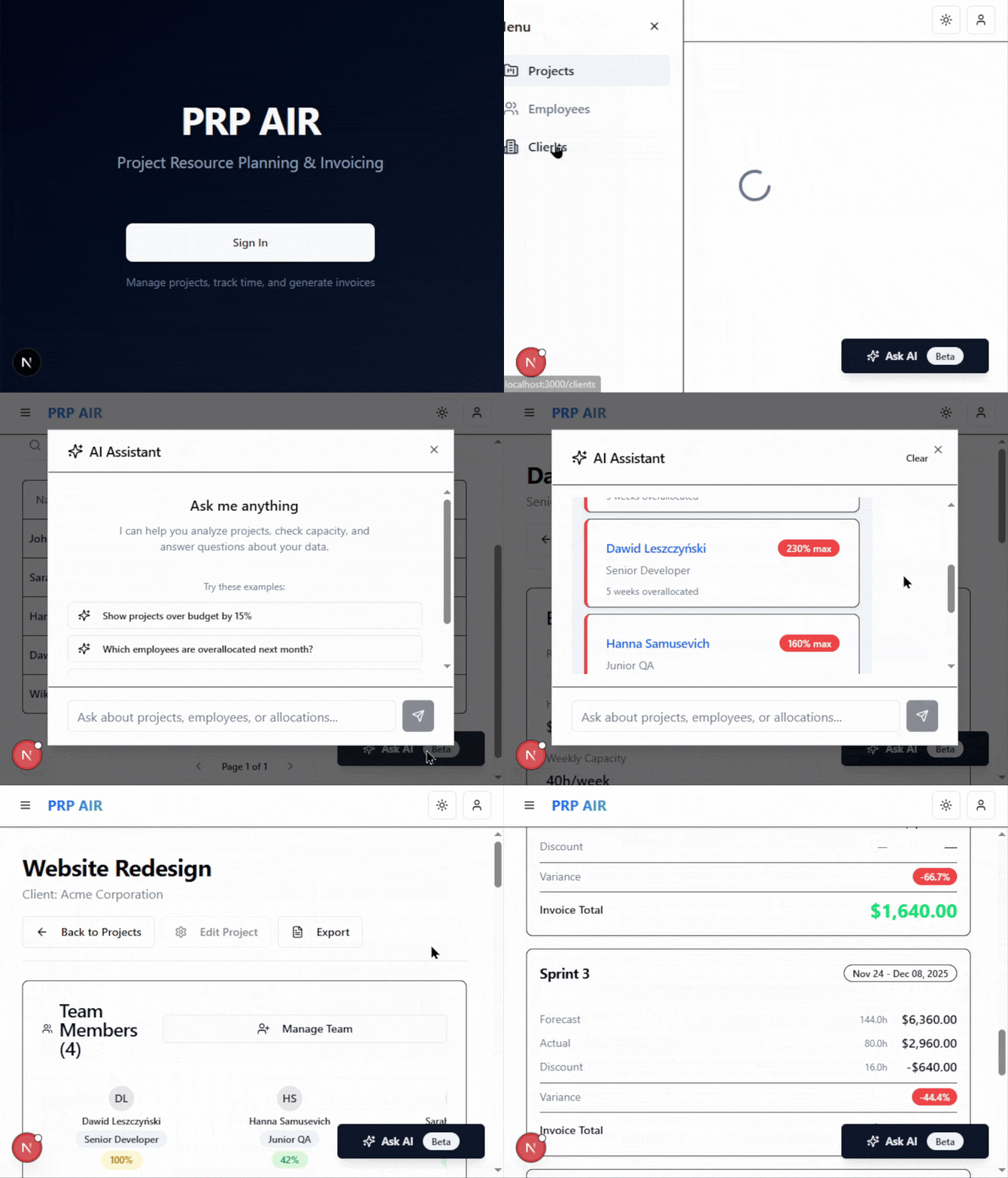
Using the outlined vibe coding workflow, the coding agent was able to develop 8 out of 11 features with only minor issues. The remaining 3 had major problems and it was struggling to resolve them on its own.
The application is fully usable on localhost with a database I setup in Docker. The only feature that is still not working at all are the AI commands, not shown in the preview. That being said, there are also a lot of edge cases the agents did not consider like correct handling for historic allocations and invoices when people get a raise or go part-time, but I okayed it for the experiment as I wanted to simplify.
Out of the box, coding agents were struggling to plan and write DRY and maintainable code. I believe you would need to be very explicit about those rules to get the best results, just like with new developers.
The project took 7 days to complete, including some additional documentation for the experiment.
Traycer AI as the planning agent
The plans are very comprehensive, the tool is very inexpensive, and it’s an incredible second layer to your coding agents, allowing for a meaningful feedback loop without a person involved.
The first drawback was that it struggled accepting newer versions of libraries and frameworks that the large language model didn’t know about. The second drawback was that there was no ability to resolve code review comments by explaining why it was written this way — you either do it Traycer’s way or you have to leave the comment hanging.
You may be able to avoid both of those drawbacks by using a combination of MCPs like Context7 with explicit prompting, and reviewing the plans more thoroughly.
That being said, I strongly recommend Traycer AI for vibe coding. It’s not strictly necessary as the coding agents can make their own plans and review their own code, but I really loved how this pushed them to consider different problems and limitations to each approach for implementation.
Claude Code as the coding agent
Based on my experience, this seems to be among the best or even the best coding agent currently on the market. And since I finished testing the tool with Sonnet 4.5, Anthropic has released Opus 4.5, which is an even smarter model with usage limits competitive to Sonnet.
With the business premium seat, I didn’t even get anywhere close to max usage, having used 33% of Claude Code’s weekly limit and 3% of the monthly limit.
I wholeheartedly recommend it for vibe coding. It’s pricey if you are coding as a hobby, but you can also use the less expensive Pro subscription if you only need a little bit of help. Make sure to play around with different configuration options to make the most out of it.
Cursor as the coding agent
I’ve used both Claude Code and the new Cursor as my coding agents during this experiment. It was struggling at the beginning when I was trying to use it as my main coding agent for implementation and for fixing.
Seemingly, you have to be more thoughtful when you prompt Cursor and make sure it plans the work correctly. Without using Traycer AI, it was able to plan and develop some extra features like the night mode toggle and a hamburger nav for mobile devices. These turned out mostly fine.
Cursor also managed to fix some bugs that Claude Code was getting stuck on.
I would only recommend Cursor as something complementary for less complex tasks if you want it for your everyday work. I would not necessarily recommend it for vibe coding unless you have extra money to burn or you are somehow running out of usage with Claude Code.
Should you vibe code
If you’re developing a Proof of Concept for a business, and you can afford to ignore defining a lot of details like a specific UI look or API structure, vibe coding can be a great tool to help you deliver with minimal effort on your part. In those conditions, you can generally afford to start working on something else in the background, to some degree reducing fatigue and/or improving efficiency.
If you intend to use vibe coding for production code, just like real developers, your agents will require a lot of instructions to deliver it exactly how you want it. For smaller projects, it might be able to get it done most of the way on its own. You might be able to get away adding features to larger projects too when you have microservices with well defined and limited responsibilities.
It can be a very good investment as you can spend less than $200 a month for those tools and get very generous usage limits.
With all that said, be really careful about code developed by AI. Coding agents sometimes end up creating strange, unreasonable bugs and edge cases that you only see real developers commit when they don’t understand or test their code. Even when they run the browser and take screenshots to validate the functionality, they end up missing obvious visual bugs like transparent backgrounds, dropdowns showing up under modals, etc.
To avoid the drawbacks of vibe coding and take the full advantage of it, you will need the skills of a good developer and a good teacher. Then you have a good chance to cut down on anywhere between 0-80% of the manual work you’d be doing otherwise.
What’s next? Other tools on the horizon
The new Google Antigravity editor was released right after I completed this vibe coding prototype. With Gemini 3 Pro, it’s really powerful. In a few hours, I managed to create a prototype of a different application using this editor. The new Gemini 3 Pro is plenty intelligent, and the Antigravity editor offers a unique feature set.
Based on my initial impressions, Google Antigravity has a good chance of becoming one of the top vibe coding tools alongside Claude Code. The Antigravity preview still suffers from issues/bugs and we don’t know about the pricing and usage limits once it comes out, so it’s difficult to assess whether it’ll be worth using over competitors like Cursor.
OpenAI has also released their GPT-5.1-Pro and GPT-5.1-Codex-Max. I was not able to test them out, but it seems that GPT-5.1-Pro is in a class of its own for very complex reasoning tasks. The new Codex does not seem to impress people as much.
.jpg)


.jpg)
