.webp)



Key Takeaways
What we tested
“Can AI handle some of the QA tasks?” was one of the questions we asked. We wanted to see if writing acceptance criteria, creating test plans, and running basic UI tests were possible to be completed with the help of AI tools. We opted for two of them:
- Claude Cowork with Claude in Chrome (a mode within Anthropic's Claude desktop app paired with a Chrome extension that lets it control the browser) running the Opus 4.6 model
- OpenClaw (an open source AI agent framework) running free models hosted locally
What worked
Claude did well on acceptance criteria, test plans, and browser testing. OpenClaw couldn't handle the complex QA tasks on free models, but it turned out to be useful for simpler automations like weekly pull request summaries and Reddit digests.
Where we landed
For some of the QA work right now, Claude Cowork is the stronger tool, but it only works for one person at a time. OpenClaw can work with a whole team through Slack, but it needs better models (and more patience during setup) to do anything serious. We plan to revisit OpenClaw and test it with paid frontier models.
Introduction
Some of the QA work gets really repetitive. Writing acceptance criteria for every user story, drafting test plans, running smoke tests after each deployment. These are the kinds of tasks that just ask to be handed off to your favorite AI tool. We wanted to see if that's viable.
We picked three things to test:
- Writing acceptance criteria for user stories in Azure DevOps (that's where we keep our project tickets and backlogs)
- Writing test plans and test cases
- Running basic UI tests: smoke tests, feature checks, regression
I tried two tools: Claude Cowork with Claude in Chrome browser extension, and OpenClaw running free open source models.
Claude Cowork + Claude in Chrome
Quick primer
A few terms before we get into it. Claude Cowork is a mode within Anthropic's Claude desktop app. Think of it as a local AI assistant that can work with your files and connect to outside services. These outside services are available either as official Claude connectors or through the Model Context Protocol (MCP). Claude in Chrome is a Chrome extension that gives Claude control over a browser, so it can click things, fill out forms, and navigate between pages.
Claude also has two ways to customize its behavior. Skills are instruction packages: they tell Claude how to do a specific task in a repeatable way. For example, a "write acceptance criteria" skill includes a template, quality guidelines, and the expected output format. Agents go a step further. An agent is a profile that combines multiple skills with a role; it knows when and how to combine available skills. A "Smoke Tester" agent knows which skills to pull in and how to approach smoke testing as a whole.
What we set up
To save some time, I looked at what existing community skills were available for QA. There were quite a few that matched our needs, so I packaged them into a plugin (a bundle of skills and agents you can distribute) with specialized agents for each QA task:
Skills:
- Generate Acceptance Criteria
- Create Test Plan
- QA Test Orchestrator
- Smoke Test / Regression Testing
- Execute Test Cases
Each skill came with reference materials like writing guides, templates, and scripts. The idea is that Claude follows the template instead of making up a new format every time.
Agents:
- QA Orchestrator
- UX Auditor
- Smoke Tester
- Resilience Tester
- Feature Tester
- Adversarial Tester
I also installed the Chrome extension for browser control, the Slack connector (so Claude could post test reports to our channel), and the Azure DevOps MCP. This MCP is a really useful tool in the hands of Claude on its own, but in my case, I limited it to reading from and writing to our project boards.
Acceptance criteria results
I had Claude create a fictional project in Azure DevOps with epics, features, and user stories, then write acceptance criteria for each story. This was a good test because besides common sense, domain understanding is required to come up with meaningful acceptance criteria.
The output was solid. Here's a concrete example. For a user registration story, a quick first draft from a human might look like this:
As a new user, I want to register with my email and a password so I can access the platform.
Claude produced four criteria following the “Given-When-Then” formula that for the sake of brevity I boiled down to the key information they convey:
- Valid email and password (minimum 8 characters, one uppercase, one number, one special character) creates an account and redirects to role selection.
- Email already registered: error message with a link to log in instead.
- Password doesn't meet requirements: inline validation shows which rules failed.
- Successful registration triggers a verification email; the user is told to verify before getting full access.
This pattern repeated across the project. Claude covered happy paths, error flows, edge cases, and domain details. The skill templates kept the format consistent across dozens of stories, which matters when you're handing these off to a QA team.
Browser testing
For the browser test, I pointed Claude at our Form2Agent AI application. It’s a voice-assisted AI solution that helps with data entry and content manipulation with text, voice, and file input support. Firstly I allowed Claude to browse the relevant Azure DevOps project. Then I gave it the URL for the demo website and Claude got off to work. It navigated the website using the Chrome extension and ran through tasks based on a test plan it wrote itself. It filled forms, clicked through multi step wizards, used the AI-powered chat and reported back on our Slack channel. The browser control was reliable and it didn't get lost between pages. The report was also a nice summary of what tests it had performed.
OpenClaw
Why OpenClaw, and why free models?
OpenClaw is an open source agent framework built for automation. Unlike Claude Cowork, it runs as a persistent service that multiple people can talk to through Slack, webhooks, or other channels. That's what interested us: a shared QA agent the whole team could use.
We also wanted to see if this kind of work could be done without paying per-token API costs. Google had just released their Gemma 4 family of models, which at the time were the strongest small models you could run on a laptop. So the two goals merged: test OpenClaw's QA capabilities using free, locally hosted models.
I set up Ollama (a tool for running language models on your own hardware) on a MacBook Pro M2 with 16 GB of memory and installed three Gemma 4 variants: e4b, 26b, and 31b. The larger two were too slow on this machine. We're talking from about 45 seconds on gemma4:26b to well over a minute on gemma4:31b for a single response to a simple “Hello”, which makes any kind of interactive work impractical. I ended up using the gemma4:31b model through Ollama's free cloud tier instead.
Configuration
Installation was easy, but the configuration was not. OpenClaw has both a CLI and a web dashboard. I started with the CLI but hit a bug in my version that crashed during Slack setup. So I tried the dashboard.
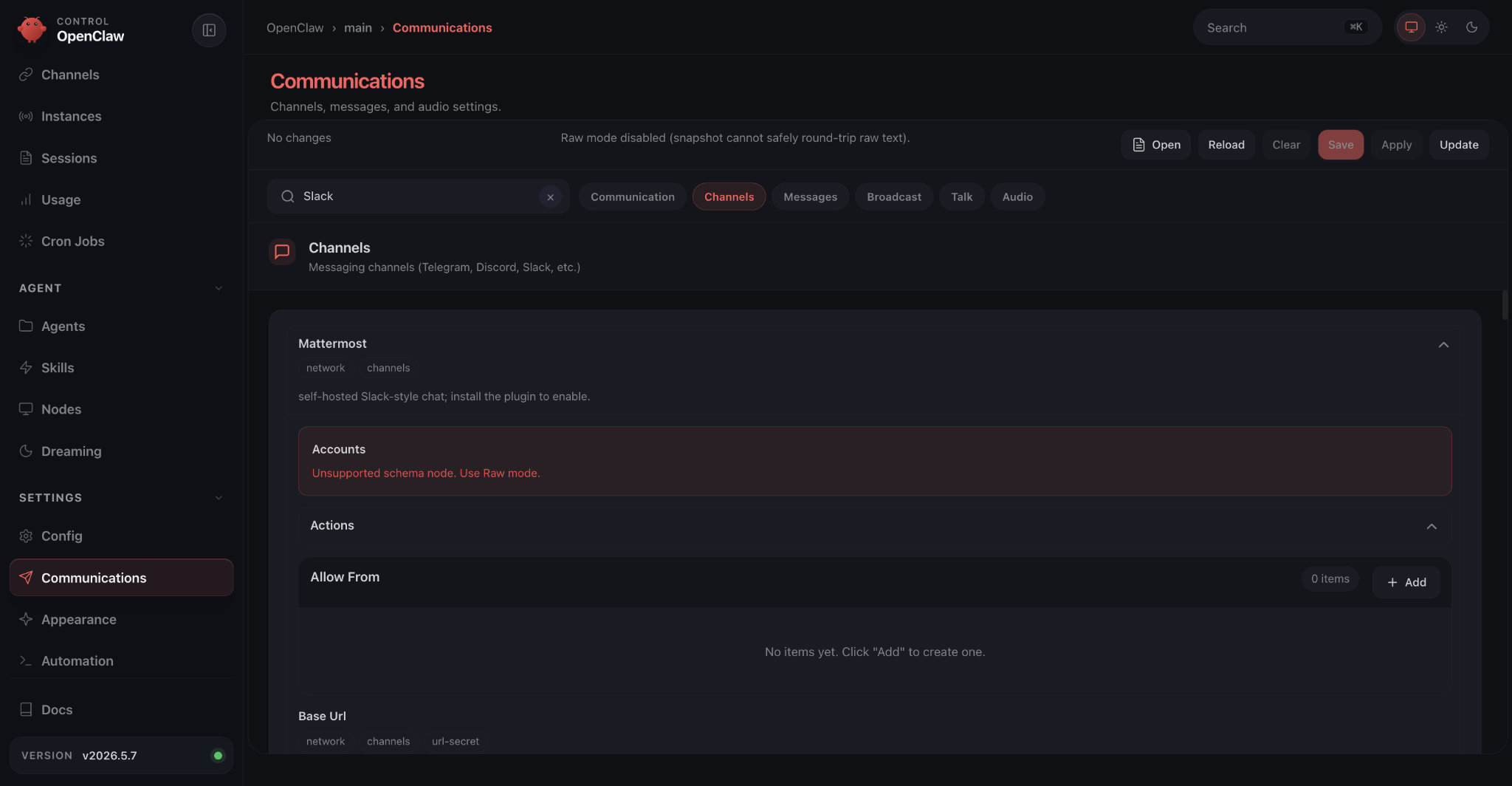
The connector list shows every option in a long scrollable page, all expanded by default, with little visual hierarchy. There is a search bar, and it works for things like Telegram, but searching for “Slack” additionally matches two different connectors. One of them has so many settings that it pushes everything else off screen. Most input fields have no description or format hint.
I ended up finding a config example buried in the documentation that I could paste into the config file directly. That got Slack connected. But messages only worked as replies to @ mentions, even though I'd turned on the setting for unrestricted responses.
The fix, after a long troubleshooting session with Claude and a coworker, was almost funny. The default profile that OpenClaw ships with (the coding profile) doesn't have the message:write permission. It literally couldn't send messages unless they were direct replies. Switching profiles fixed it.
Acceptance criteria
To reuse the previously used QA skill I needed to impose some simple modifications. OpenClaw couldn’t access the Claude in Chrome extension, but offered their OpenClaw managed browser instead. I promptly ported the skills from Claude into OpenClaw's format, connected Azure DevOps through mcporter (OpenClaw has a native skill to use this tool for accessing external services via MCP), and assigned the same acceptance criteria task.
The results were functional but thin. Using the same registration example: where Claude produced four scenarios, OpenClaw's gemma4:31b gave one:
Given a new user is on the registration page When they enter a valid email and a password meeting complexity requirements Then an account is created and they are redirected to role selection.
Due to the same skill being used here, it also successfully stuck to the “Given-When-Then” formula. The contents unfortunately lacked the detail that the ones created by Claude had. There were few stories that had error flows, edge cases or specific domain details documented as thoroughly as Claude’s.
Browser testing
I tried OpenClaw's managed browser first, which is a Chromium browser profile that the agent controls. The docs mention a bundled browser-automation skill, but I couldn't find it anywhere. I wrote a replacement with Claude's help, but then every browser command took about 30 seconds before it actually did anything. Clicks timed out. Page interactions failed. Troubleshooting the issue didn’t yield any positive results; the mysterious overhead after each command trigger still remained.
I switched to Playwright (a browser automation framework) using a community plugin along with modified skills that used Playwright instead of OpenClaw's managed browser. The agent managed to open the website in several browser windows, and that was about it. It told me all tests had passed, but there were no results to show. When I pushed for documentation, the screenshots it provided were clearly fabricated: images labeled as "completed registration flows" were just the landing page.
I also tried larger models from Ollama's free cloud tier: minimax-m2.7, qwen3.5 (397B), glm-5.1, and deepseek-v3.1 (671B). Same problems. The bigger models did try harder to troubleshoot the configuration themselves, which was interesting to watch, but none of them got browser testing working.
After the fact, I found that the Browser Control API (listed in the docs as optional) doesn't have the 30 second overhead that the CLI commands do. I wish I'd found that sooner. But by then Ollama had also pulled the aforementioned larger models from their free tier.
Where OpenClaw shined
After the QA setbacks, I tried simpler, more structured tasks. This is what the OpenClaw community mostly uses it for.
Daily Reddit digest
I set up a daily summary of Claude, Claude Code, and Cowork related subreddits. Setup was trivial; all it took was installing the “Reddit read-only” skill and one prompt to set up the automation. Every morning, OpenClaw posted a summary of the previous day's top discussions, tool releases, and community tips to our Slack channel. Nothing fancy, but it saves the 2 minutes of scrolling through subreddits for valuable news.
Weekly Pull Request digest
This one was harder to set up. It needed two automations:
- A PR description updater, triggered by a webhook whenever someone creates a pull request in Azure DevOps. It generates a structured description automatically.
- A weekly digest that runs every Monday and summarizes the previous week's PRs.
OpenClaw with the gemma4:31b model tried to set these up but couldn't get them working. I had Claude create skills with instructions on how to run these automations while I configured the webhook from the Azure DevOps side. After that, gemma4:31b handled the ongoing work fine: cron jobs, summaries, posting to Slack.
Anyone in our Slack organisation can subscribe to a project's weekly digest by simply messaging OpenClaw. Monday at 9 AM (or any other time you set during configuration), it scans the PRs for each subscribed project and sends summaries. It could prove to be quite useful for managers and executives that want to know what work was done by the team each week.
Conclusions
Given this was a first pass, there are still some things left unexplored. Here’s what we took away:
Claude Cowork + Claude in Chrome
This combination handled acceptance criteria, test plans, and browser testing. The written output was detailed and consistent. The catch is that it's a single user tool, so you can't easily share it across a team.
OpenClaw with free models
It was not up to complex QA tasks. Browser testing failed entirely and acceptance criteria were a bit shallow. But for structured, repeatable automations (PR digests, Reddit summaries) it worked, and the ability for anyone on the team to interact with it through Slack is a real advantage.
On configuration
OpenClaw's dashboard and documentation are far from perfect. Check profile permissions first, use the Browser Control API instead of CLI commands for anything browser related, and budget extra time for troubleshooting.
What’s next
The question we haven't answered is whether OpenClaw's QA failures were caused by setup issues, the tool itself or by the free models we’ve used. I ran Claude on Opus 4.6, which is a way bigger model than any of the models in the Gemma 4 family. Our next step is to test OpenClaw with paid frontier models and see if the results improve. If they do, OpenClaw's team wide communication combined with a strong model could be a practical setup for shared QA automation. We'll report back.